Security Camera
- 3.9
- Rating
- 10.00K
- Installs
- Free
- Price

 Analysis by App-foxy
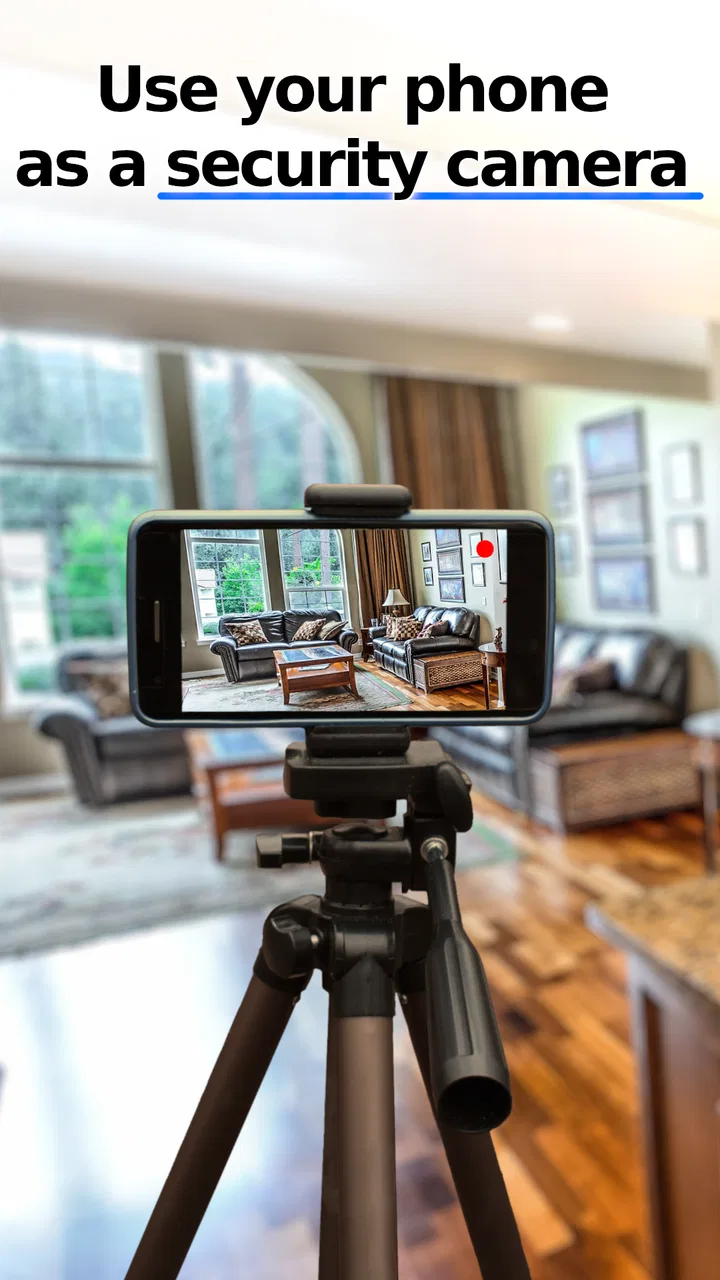
I tested Security Camera as a practical House & Home tool rather than treating it like a full alarm system. Its basic idea is simple: an Android phone becomes a camera that you can view remotely from another device. That makes it interesting for people who already have an unused phone and want a low-cost way to check a room, a doorway, a pet area, or a temporary setup.
My experience was mixed in a useful way. The app is approachable because the concept is easy to understand, and its free entry point removes much of the hesitation around trying it. At the same time, a phone-based camera has limits that are easy to overlook. It depends on the old handset, its battery, its camera position, its network connection, and the comfort of the person operating it. I would recommend it for light monitoring and short-term situations, but I would not treat it as a replacement for a dedicated security system.
How clearly the app works for different people and situations
I find the app’s clearest strength is that it gives a familiar Android phone a focused role: a camera at one location, with a live view available remotely. That can make a quick visual check feel more approachable than learning a separate camera system, especially when the need is temporary. The next question is how to make that simple arrangement useful without mistaking it for a complete security setup.
You May Also Like

 AccuWeather: Weather Radar
AccuWeather Review: A Quick, Clear Forecast for Everyday Decisions
For everyday plans, the best forecast is the one you can understand quickly. AccuWeather makes rain timing, radar, and local conditions easy to act on, with a few trade-offs.

 Hill Climb Racing
Why Hill Climb Racing Still Turns Crashes Into One More Run
A tiny car, a bumpy hill and one more upgrade: Hill Climb Racing keeps resurfacing because its simple chaos makes every near-miss feel personal.

 AliExpress - Shopping App
AliExpress Makes Global Shopping Feel Personal, but Shoppers Bear the Risk
AliExpress turns a global marketplace into a pocket-sized discovery engine. Its reach is useful, its shopping loop compelling, and its trade-offs easy to miss.

 Lords Mobile: Kingdom Wars
Lords Mobile Is a Kingdom-Building Routine, Not a Quick Match
A case-by-case verdict on the building, battles, device demands, and social commitments that make Lords Mobile rewarding for some players and exhausting for others.

 PDF Scanner app - TapScanner
TapScanner Makes Paperwork Easier to Capture, Check, and Share
TapScanner makes scanning with a phone feel less like a rescue operation and more like a dependable step in getting work done. Its capture tools are useful, though not flawless.

 Block Blast!
 Shows How Much a Puzzle Game Can Leave Out
A quiet grid game shows why puzzle players increasingly value instant clarity, repeatable skill and low-pressure play—and where the genre still needs to catch up.
More From Our News Desk
View All News


Readability and navigation during setup
Security Camera is made by LineCast and belongs to the home-focused category, so its purpose is narrower than that of a general smart-home platform. I found the central workflow easier to grasp than apps that try to combine cameras, sensors, automation, cloud storage, and alarm controls in one crowded interface. Here, the important question is straightforward: which phone is acting as the camera, and which device is being used to watch it?
That simplicity is valuable for someone who is not comfortable with complicated technology. A person helping an older relative, for example, can explain the arrangement in ordinary language: leave one Android phone in the room, then use another device for the remote view. The app’s store summary describes remote live viewing, and that is the feature around which the whole experience makes sense.
For readability, I would still approach setup patiently. A live camera app asks the user to keep track of two physical devices, not just one screen. Confusion can happen when the phone placed in the room is mistaken for the viewing device, or when the camera is pointed at a wall, window, or bright light source. These are not glamorous problems, but they matter more than a polished menu when the goal is dependable observation.
A useful habit is to label the roles before starting. I call the phone left at home the camera phone and keep the viewing device in my hand. I also check the camera view immediately after positioning the handset, rather than assuming that the first angle will be useful. This small routine helps people with limited technical confidence because it turns an abstract connection process into a visible physical arrangement.
The app has a 3.9 average from around 88 ratings, with about 15 written reviews. I would read that as a sign that the experience is useful for some people but not universally smooth. It is not a reason to dismiss the app, but it is a good reminder to test the complete setup before relying on it for something important.
Motor and sensory considerations
The strongest accessibility advantage is the possibility of using a phone someone already understands. A familiar Android handset can be easier to position and operate than a separate camera with unfamiliar controls. If a user has difficulty learning new hardware, reusing a known phone may reduce the physical and mental effort involved in creating a basic monitoring point.
There are also practical motor considerations. The camera phone needs to be placed securely, and the angle may need several adjustments before the view is useful. Someone with limited hand strength or reduced fine-motor control might need another person to position it. I would not describe the app itself as solving that issue; its benefit is mainly that the hardware is familiar and widely available.
For people with limited vision, a live view can be useful when another person needs to check a space without walking there. A caregiver could look at a room from another location, or a user with difficulty moving around could inspect whether a doorway or hallway is clear. However, the usefulness depends on the screen, the camera image, and the viewing conditions. The app should not be treated as a substitute for a dedicated visual accessibility tool, especially when identifying small details is important.
Users with hearing loss may also find a visual check more useful than relying on sounds from a room. The reverse is true for someone who cannot easily watch a screen continuously: a live camera view is not the same as an alert system. I would use it when I want to look in on a place at a chosen moment, not when I need guaranteed notification that something happened.
One of my more practical tips is to think about contrast and lighting before blaming the application. A camera pointed toward a bright window can make people or objects appear dark. A dim room can also make the view less informative. Positioning the phone so that the important area receives even light often improves the result more than repeatedly changing settings.
Situational access: where the phone-camera approach fits
Security Camera makes the most sense in temporary or low-risk situations. I can imagine using an old Android phone to check on a sleeping pet, watch a front room while waiting for a delivery, or keep an eye on a space during a short renovation. These examples share an important trait: the user wants visibility, not a complete record of every event or a professionally installed protection system.
A realistic everyday scenario would be leaving a spare phone on a shelf while working in another part of the home. I would first connect the devices, place the camera phone where it cannot be knocked over, plug it into power if appropriate, and then view the room remotely for a short period. Before leaving, I would check the framing and make sure the phone is not hidden under fabric or pressed against a heat source. That workflow is simple, but it shows why this app can be more useful than its short description suggests: it gives an old handset a second job.
It can also help when someone needs occasional reassurance rather than constant supervision. A family member might want to check whether a relative’s living area looks normal, but the arrangement should be discussed openly and used respectfully. A camera pointed at a shared or private space raises trust and privacy questions even when the technical setup is easy.
The free price makes experimentation accessible, while in-app purchases range from less than a dollar to just under twenty-four dollars per item. I would not buy anything until the no-cost experience has been tested in the exact place where the phone will be used. The value depends heavily on whether the live view is stable enough for that particular home, network, and handset.
The application is suitable for Everyone, which fits its straightforward home-monitoring concept. That age classification does not remove the need for adult judgment around privacy, consent, and where a camera is pointed. I would never place a phone-camera in a bathroom, bedroom used by another person, or any shared area without clear permission.
What it offers compared with usual alternatives
The usual alternatives fall into two broad groups: dedicated security cameras and video-call or remote-access tools. A dedicated camera normally wins on purpose-built mounting, continuous operation, and features designed specifically for monitoring. It is the better choice when the camera must run reliably for long periods, cover an entrance, or form part of a broader security plan.
Security Camera’s advantage is flexibility. Instead of buying another device immediately, I can repurpose an Android phone I already own. That can be especially useful for renters, students, people testing an idea, or anyone needing a camera for a temporary event. The trade-off is that an old phone may have a tired battery, a less capable camera, or a screen that remains active in a way the user did not expect.
Compared with a video-call application, this app is more directly focused on turning a phone into a remote viewing point. A general calling tool may be familiar, but it can bring unnecessary conversation controls and a workflow designed for people rather than unattended observation. Security Camera is the more natural fit when the purpose is simply checking a space.
On the other hand, I would choose a dedicated product over this app for high-value property, outdoor exposure, or situations where missed coverage could have serious consequences. A repurposed phone is a clever convenience, not a guarantee. The distinction is important: remote live view can show what is happening when I look, but that alone does not promise recording, alerts, evidence storage, or protection against a determined intruder.
Remaining barriers before depending on it
The first barrier is the need for a spare Android phone. The minimum operating system is Android 5.0, so the app is compatible with older devices, but compatibility does not automatically mean that every old handset will be comfortable for continuous use. Battery health, heat, camera quality, storage condition, and physical stability all become part of the experience.
The second barrier is environmental. A phone placed on a table can be bumped, covered, or moved. A narrow field of view can leave important areas outside the frame. A room that looks clear from one angle may have a blind spot near the floor or behind furniture. I recommend doing a slow visual audit of the entire area before trusting the arrangement, especially if the user has limited mobility and cannot easily reposition the phone later.
The third barrier is attention. Live viewing requires someone to open the viewer and look. That is different from an automated system that calls attention to a possible event. If the user needs an immediate warning rather than occasional checking, this app may be the wrong tool. It is also not the right choice for someone who expects a complete security package without managing the camera phone.
Privacy is another serious consideration. A phone camera can capture people who did not agree to be watched, and remote access increases the importance of choosing a responsible location and limiting who can view it. I would explain the setup to everyone affected, avoid private spaces, and remove the camera phone when the monitoring period ends. The convenience of reusing a phone should never outweigh another person’s reasonable expectation of privacy.
There is also a maintenance burden that is easy to miss. The camera phone must remain positioned, powered as needed, and ready to connect. I would test the view before every important use rather than assuming yesterday’s setup still works. A simple checklist—phone position, lens clear, power available, remote view working—can prevent a false sense of security.
The current version is 2.92, and the app has passed the ten-thousand-install mark. Those details suggest that it has found a real audience, but they do not change the central trade-off: this is an accessible way to try remote viewing, not a promise of professional-grade monitoring. I appreciate it most when I judge it by that smaller, clearer job.
Who should try it, and who should choose something else
I would suggest Security Camera to someone with an unused Android phone who wants a quick, inexpensive way to view one indoor area. It is a good candidate for a temporary setup, a personal experiment, or a household where the main need is occasional visual reassurance. It can also be a sensible first step for someone deciding whether remote monitoring is useful before spending money on dedicated equipment.
I would be more cautious for users who need hands-free access, automatic warnings, long-term recording, outdoor durability, or dependable operation during an emergency. Those needs point toward a purpose-built camera or a broader home-security service. The app’s free entry point is appealing, but buying in-app items will not turn an ordinary phone into hardware designed for every environment.
People with motor or sensory limitations may benefit from the familiar phone format, but they should plan the physical setup around their own abilities. A helper may be needed to mount or reposition the camera, and the viewing device should be placed where it is easy to reach and see. If a person cannot regularly check the live view, the app’s usefulness decreases unless another trusted person takes responsibility for that task.
One non-obvious strength is that the solution can be scaled informally: a household with more than one spare phone can consider separate viewing points for different short-term needs. I would still test each position independently, because adding another phone also adds another battery, angle, and connection to manage. The flexibility is real, but so is the maintenance.
My inclusive verdict
After using Security Camera as a repurposed-phone monitor, I see it as a practical tool with a clearly defined ceiling. Its best quality is not advanced security technology; it is the low barrier to trying a remote live view with hardware many people already have. The familiar device can help users who find dedicated equipment intimidating, and the free starting point makes the experiment approachable.
Its limits are equally important. A phone must be positioned correctly, kept available, and checked by someone. The experience depends on the surroundings and on the person’s ability to manage the physical setup. The app does not remove the need for privacy decisions, regular testing, or a backup plan when monitoring really matters.
My recommendation is to use it as a convenient, short-term window into a home space, not as your only line of defense. For a pet check, a temporary room monitor, or a trial before buying hardware, it is worth exploring. For serious security, continuous unattended operation, or users who need automatic support rather than manual viewing, a dedicated alternative will be the more inclusive and dependable choice.
FAQs for Security Camera
01What is Security Camera, and what can I use it for?
Security Camera is a mobile application designed to turn a compatible smartphone or tablet into a basic monitoring camera. After installation, you can use the device to watch an area such as a room, entrance, office, garage, or nursery. Depending on the version and device, the app may provide live video, motion alerts, audio monitoring, recording, and remote access through another connected device.
02Does Security Camera work without an internet connection?
The answer depends on how you plan to use the application. A phone acting as the camera may work on the same local Wi-Fi network as the viewing device, but remote monitoring from outside your home generally requires an internet connection. Before relying on it, check whether your chosen features need mobile data, cloud services, or continuous Wi-Fi, since interruptions can stop live viewing and notifications.
03Can Security Camera record video and send motion alerts?
Many Security Camera features are built around motion detection and recording, but availability can vary according to the app version, operating system, permissions, and subscription plan. You may need to activate notifications, microphone and camera access, background activity, and storage permissions. It is also worth testing sensitivity settings, because pets, changing light, and moving curtains can create unwanted alerts.
04Is Security Camera safe and private to use?
Because the application can access your camera, microphone, network, and possibly stored recordings, privacy settings deserve careful attention. Install it only from an official store, review the permissions requested, and use a strong account password if sign-in is required. Avoid positioning the device in private areas, and check whether recordings are stored locally or uploaded to a cloud service.
05What devices and setup are needed to use Security Camera?
You normally need two compatible devices: one smartphone or tablet placed in the area you want to monitor and another device used to view the feed. Both devices should have supported operating systems, working cameras, sufficient battery or constant power, and a stable network connection. Keep the camera device securely positioned, allow the required permissions, and complete a test before using it for important monitoring.
Pros
- Turns an old phone into a practical home monitoring camera.
- Supports motion alerts to help you notice activity quickly.
- Remote viewing lets you check the camera from almost anywhere.
- Simple setup makes it accessible for users with limited technical skills.
- Useful for monitoring pets
- children
- entrances
- or empty rooms.
Cons
- Video quality depends heavily on the phone’s camera and lighting.
- Continuous streaming can drain the phone battery and generate heat.
- Reliable monitoring requires a stable internet connection.
- Some advanced features may require in-app purchases or subscriptions.
- Privacy depends on securing both devices and the account properly.

Security Camera
Gallery